Ngày âm hôm nayToday's lunar date
Xem nhanh ngày âm, tháng âm, can chi và trạng thái ngày tốt xấu ngay khi mở app.Quickly check the lunar day, lunar month, heavenly stems and branches, and day quality when opening the app.
Lịch âm cho ông bà, bố mẹ: chữ lớn, tương phản rõ, thao tác đơn giản. Mở ra là thấy ngày âm hôm nay, ngày tốt xấu và giờ tốt. A lunar calendar for grandparents and parents: large text, clear contrast, simple controls. Open it and see today's lunar date, day quality, and lucky hours right away.

Quét mã bằng điện thoại để cài ngayScan with your phone to install
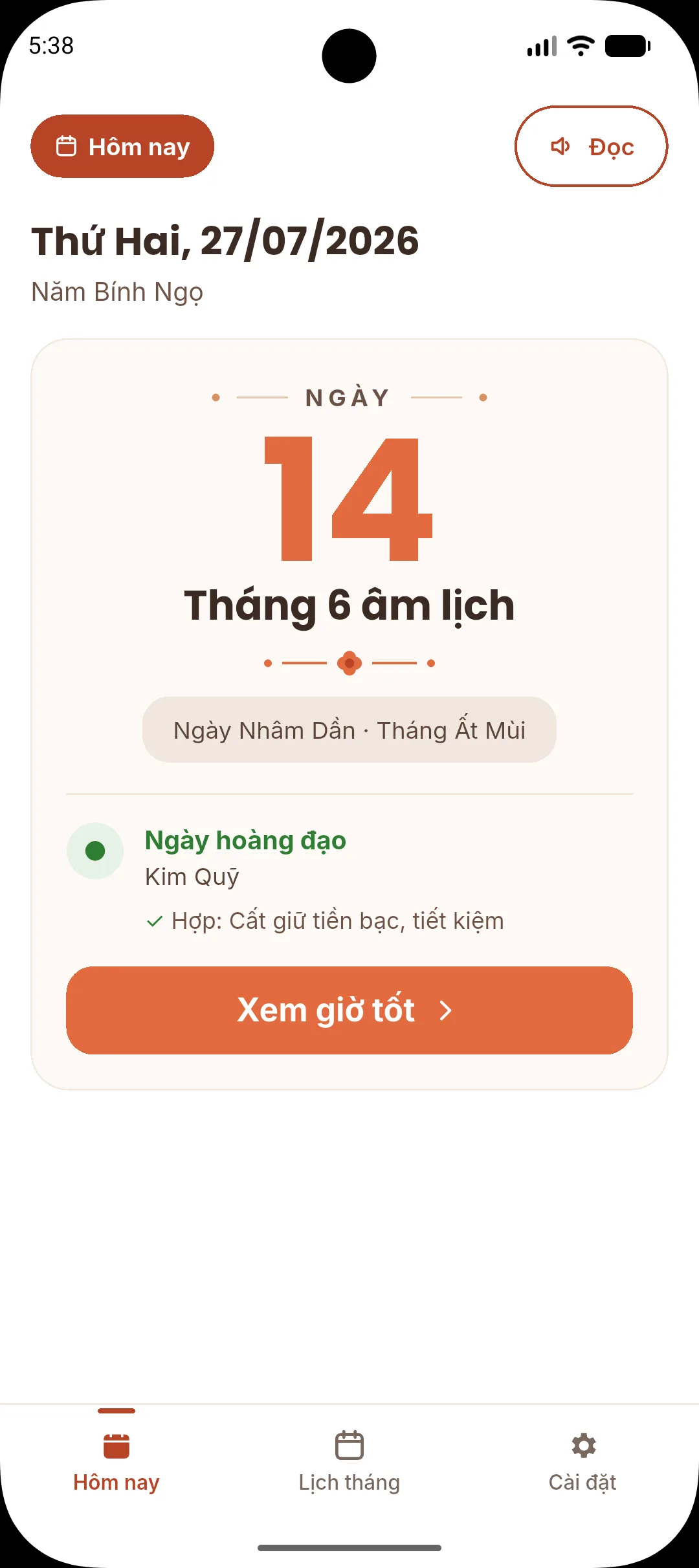

Ngày âm thật to, biết ngay hôm nay tốt hay xấu.A big lunar date and the day's quality at a glance.

Âm và dương trong một ô, mùng 1, rằm, ngày lễ nổi bật.Solar and lunar dates together, with key days marked.

Can chi, hoàng đạo, việc hợp và giờ tốt của từng ngày.Stems and branches, day quality, suitable activities, lucky hours.

Đủ 12 giờ trong ngày, đánh dấu giờ đang diễn ra.All 12 traditional hours, with the current one marked.

Đổi ngày âm ra ngày dương để biết giỗ, rằm rơi vào hôm nào.Convert a lunar date to its solar date in one step.

Bấm Đọc, ứng dụng đọc ngày âm và giờ tốt cho bạn nghe.Tap Read and the app speaks the date and lucky hours.

Xem ngày âm ngay ngoài màn hình chính.The lunar date right on your home screen.

Ba cỡ chữ, đổi lúc nào cũng được.Three sizes, change them anytime.
Giao diện tập trung vào thông tin quan trọng, hạn chế rối mắt và giữ thao tác quen thuộc. The interface focuses on important calendar details, avoids clutter, and keeps everyday actions familiar.
Xem nhanh ngày âm, tháng âm, can chi và trạng thái ngày tốt xấu ngay khi mở app.Quickly check the lunar day, lunar month, heavenly stems and branches, and day quality when opening the app.
Theo dõi ngày dương và ngày âm trong cùng một màn hình, dễ nhận ra mùng 1, rằm và ngày hiện tại.Track solar and lunar dates together, with clear markers for the first lunar day, full moon, and today.
Mở chi tiết ngày để xem giờ tốt, việc hợp và việc nên tránh theo dữ liệu lịch âm trong app.Open day details to see lucky hours, suitable activities, and things to avoid based on the app's lunar calendar data.
Nhập ngày âm để biết là ngày dương nào, hoặc nhảy nhanh tới bất kỳ tháng nào từ năm 1800 đến 2199.Enter a lunar date to find its solar date, or jump to any month from 1800 to 2199.
Nhấn nút Đọc để nghe thông tin ngày âm được đọc to, rõ ràng bằng giọng nói, tiện cho người cao tuổi hoặc người mắt kém.Tap Read to hear the day's lunar details spoken aloud in a clear voice. Handy for seniors or anyone with low vision.
Đặt nhắc trước cho các ngày âm quan trọng như mùng 1, rằm, ngày lễ và nhận thông báo đúng lúc.Set reminders ahead of important lunar days such as the first day, full moon, and holidays, then get notified on time.
Chọn cỡ chữ Vừa, To hoặc Rất to, và đổi lại trong Cài đặt bất cứ lúc nào.Choose Medium, Large, or Extra Large text, and change it anytime in Settings.
Đưa lịch âm ra màn hình chính để xem nhanh mà không cần mở ứng dụng.Place lunar calendar information on the home screen for quick checks without opening the app.
Hỗ trợ giao diện tối để đọc lịch vào buổi tối ít chói hơn.Dark mode helps reduce glare when reading the calendar in the evening.
Màu sắc, khoảng cách và nút bấm được giữ rõ ràng để người lớn tuổi dễ dùng trong sinh hoạt hằng ngày.Colors, spacing, and controls stay clear so older users can use the app comfortably in daily routines.
Video ngắn giới thiệu Lịch Âm Chữ To và những tính năng chính.A short video introducing the app and its main features (in Vietnamese).
Video chỉ tải từ YouTube khi bạn bấm phát. The video loads from YouTube only when you press play. Mở trên YouTubeOpen on YouTube
Cài cho bố mẹ xong, làm thêm bốn việc này là dùng được ngay.After installing it for your parents, do these four things and it is ready to use.
Lần đầu mở app, chọn cỡ chữ vừa mắt nhất.On first launch, pick the size that is easiest to read.
Đưa ngày âm ra màn hình chính để khỏi phải mở app.Put the lunar date on the home screen so there is no need to open the app.
Được báo trước mùng 1, rằm và ngày lễ.Get notified before the first day, full moon, and holidays.
Bấm Đọc để nghe ngày âm và giờ tốt.Tap Read to hear the lunar date and lucky hours.
Ứng dụng dành cho người muốn xem lịch âm rõ ràng, đặc biệt là người cao tuổi hoặc người cần chữ lớn, ít rối mắt.It is for anyone who wants a clearer lunar calendar, especially older users or people who prefer large text and a simple layout.
Không. Mở app là xem được lịch ngay, không cần tạo tài khoản.No. Open the app and the calendar is there, no account needed.
Có. Ngày âm, giờ tốt và ngày tốt xấu được tính ngay trên điện thoại nên vẫn xem được khi không có mạng.Yes. Lunar dates, lucky hours, and day quality are calculated on the phone, so they work without an internet connection.
Vào Cài đặt, bật Nhắc ngày quan trọng, rồi chọn Báo trước và Giờ nhắc. Khi điện thoại hỏi quyền gửi thông báo, bạn chọn Cho phép.Open Settings, turn on Important-day reminders, then choose how many days ahead and the reminder time. When the phone asks for notification permission, choose Allow.
Có. Bạn có thể đổi giữa Vừa, To và Rất to trong phần Cài đặt bất cứ lúc nào.Yes. You can switch between Medium, Large, and Extra Large in Settings at any time.
Hiện ứng dụng có trên điện thoại Android, tải qua Google Play.The app is currently available for Android phones on Google Play.
Không. Ứng dụng tải miễn phí trên Google Play và có hiển thị quảng cáo.No. The app is free to download on Google Play and shows ads.
Mở nhanh, chữ lớn, thông tin rõ. Phù hợp để xem lịch âm mỗi sáng hoặc trước khi cần chọn ngày giờ.Fast to open, large to read, and clear to understand. Useful for checking the lunar calendar every morning or before choosing a date and time.


Quét mã bằng điện thoại để cài ngayScan with your phone to install
